



Timeline
Upcoming Dates To Know
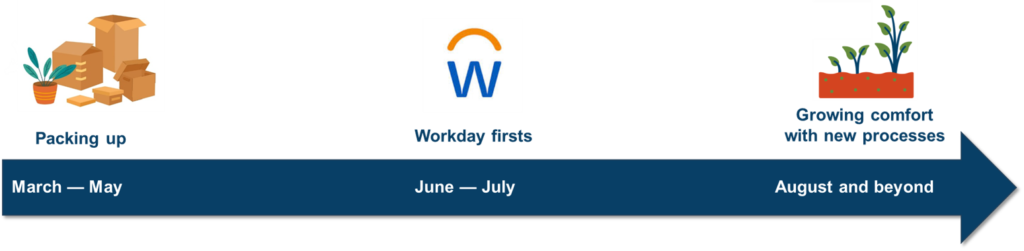
When moving homes, we typically try to avoid getting new items that would only need to be packed up and receiving new deliveries that could get missed in the transition. Similarly, large ERP projects like this one, require a pause in financial and HR transactions to ensure data can be accurately moved and validated between the old and new systems. The following dates and pause periods will help support a smoother move to Workday.
Expense Reporting and Payment Dates
-
May Pcard Transactions – Follow current processes
- June 6: May Pcard transactions should be reconciled on the Wells Fargo site.
- June 10: Approvals are due as usual.
- Due to credit card processing timing, it is possible late May Pcard transactions could show up in June to be reconciled. Purchases made before or on the May 31 will need to be reconciled in Wells Fargo.
June Pcard transactions – Use Workday
- Starting June 1: Purchases made on or after the June 1 will be reconciled in Workday.
-
- June 1: First day to submit out-of-pocket expenses in Workday.
- June 10 end of day: Last day to access Wells Fargo site.
- All out-of-pocket expenses must be submitted AND approved in Wells Fargo by the end of the day.
- Any outstanding out-of-pocket expenses will either need to be re-entered by the cardholder in Workday.
-
Dates will be shared as part of Financial Year End communications.
- Goods and services received on or before June 30 should use the check requests and vendor invoice processes used before Workday.
-
Dates will be shared as part of Financial Year End communications.
- Purchases made before or on the cut off date will need to be reconciled in Wells Fargo site
- Purchases made on or after the go-live date will need to be reconciled in Workday
- Last day to reconcile purchases in Wells Fargo site.
-
Dates will be shared as part of Financial Year End communications.
- June 1: First day financial reports, like Budget to Actuals, are available on-demand in Workday.
- June 21: Last day for scheduled Argos reports to be sent out.
Time Entry, Time Off, and Pay Dates
-
For Pay Period May 31-June 13
- June 13: Last day to use TimeClockPlus (TCP Clocks) and Web Time Entry/Web Clock (1600grand)
- Staff working overnight will receive separate instructions on time entry for the cutover to Workday.
- June 13: Last day to submit Timesheet Correction Request for previous pay periods
- Corrections needed for the Pay Period May 31-June 13 and later will be made in Workday
- June 15 4:30pm: Timesheets are due
- June 16: Manager/Supervisor time approvals are due
- June 18: Last biweekly paycheck paid out of Banner. Paystubs will be available in Banner.
For Pay Period June 14-June 27
- June 14: First day to use Workday for time entry and clocking in and out
- June 29 end of day: First Workday timesheet due
- July 2: First payroll out of Workday. Payslips will be available in Workday.
- June 13: Last day to use TimeClockPlus (TCP Clocks) and Web Time Entry/Web Clock (1600grand)
-
- June 30: Last monthly paycheck paid out of Banner. Paystubs will be available in 1600grand.
- July 10: Last day to enter Leave Report (1600grand)
- Any leave taken on or before June 30 must be entered in a Leave Report (1600grand)
- July 1: First day to enter absence request/time off including holidays in Workday
- Any absence request/time off including holidays on or after July 1 must be entered in Workday
- Time off can be entered up to a year in advance. Entering time off prior to the event will provide accurate time off balances for personal planning.
- Time off can still be entered after the absence, but time off balances will not be accurate until it is entered and approved in Workday.
- July 31: First monthly paycheck paid out of Workday. Payslips will be available in Workday.
Student Employment Dates
-
- March 11: Hiring for summer jobs in JobX may begin
- May 12: Student employees may begin summer jobs
- May 25: Last day to hire in JobX for summer jobs
- Students must accept their job offer in JobX by May 25 in order for their position to be carried over into Workday.
- Offers that are not accepted by this date will not transfer into Workday and require the offer process rerun in Workday in June.
- Exceptions may be made for summer student employees who will not work past June 13.
- May 26 through May 31: No new job postings, offers extended, or hires entered in to HR systems
- This pause is critical to ensure accurate records make it into Workday.
- June 1: First day to resume hiring in Workday
- Supervisors may post student jobs, review applicants and complete hiring directly within Workday.
- All student employment actions moving forward including job postings, offers, hires and job changes must be completed in Workday.
These dates are based on the March 12, 2026, Student Employment announcement regarding Workday hiring timelines; the full message is available in the communication archives.
-
- March 11: Hiring in JobX may begin Academic Year 2026-2027 jobs
- May 18: Last day to hire in JobX for Academic Year 2026-2027 jobs
- Students must accept their job offer in JobX by May 18 in order for their position to be carried over into Workday.
- All students who have been successfully hired in JobX by May 18 will have their data migrated into Workday.
- If the position is not filled by this date and you would like to continue recruiting, you will need to repost in Workday starting June 1 to resume hiring.
- May 19 through May 31: No new job postings, offers extended, or hires initiated
- This pause is critical to ensure accurate records make it into Workday.
- June 1: First day to resume hiring in Workday
- Supervisors may post student jobs, review applicants and complete hiring directly within Workday.
- All student employment actions moving forward including job postings, offers, hires and job changes must be completed in Workday.
- June 15: First day for first-year students to apply for jobs.
These dates are based on the March 12, 2026, Student Employment announcement regarding Workday hiring timelines; the full message is available in the communication archives.
Other Hiring and HR Dates
-
- March 20: Last day to submit Faculty candidates to the Provost’s Office to be hired
- Last day to post a new staff job → MONTH DAY
- Last day to make staff employment offers → MONTH DAY
- May 4: Last day to post new staff jobs.
- May 26: All active jobs will be closed.
- May 26-June 2: All temporary hiring will be paused
- June 2: First day for faculty and staff hiring to resume in Workday
-
- Last day for making changes to personal information (e.g. home address change) and payroll elections (e.g. direct deposit) in 1600grand → MONTH DAY
- May 29: Last day to make personal information changes in 1600grand/Banner. Changes made after April 6 will not appear in Workday until manual data entries are completed and processed.
- June 1: First day for making changes to personal information in Workday. Changes made in Workday will appear immediately following any necessary approvals.
-
- May 31: Last day for any new hire, qualifying life event, and Retirement/HSA changes can be made through 1600grand/Bswift.
- June 1: First day for new hires, qualifying life event, and Retirement/HSA to be done in Workday.
-
- 2025-2026 Performance Reviews will follow current processes using Google Docs
- Starting August 1: 2026-2027 performance management reviews will in Workday.
Phase One and Two Implementation Schedule
Phase One includes HR, Payroll, and Finance services and officially kicked off in August 2025. The Macalester community will be able to first log into Workday in June 2026, and support for Phase One will continue into Phase Two.
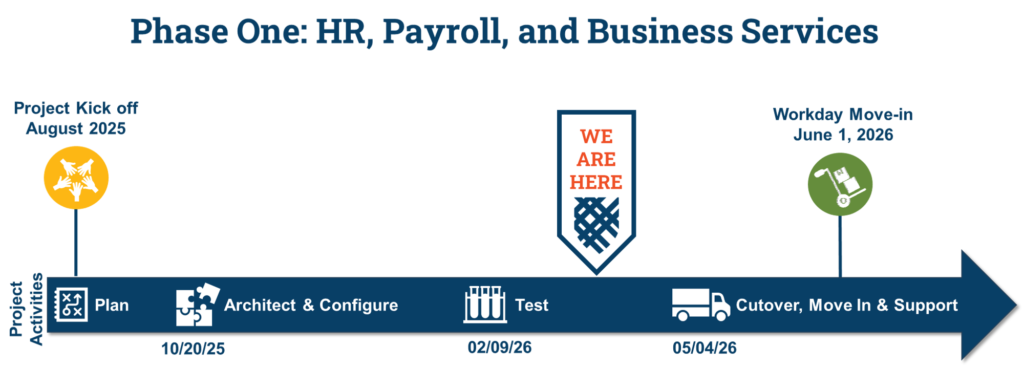
- August 1, 2025 to October 20, 2025 is the Plan phase. In Plan, the team reviewed scope, created timelines, and established project tools and processes. Team members also began Workday training to grow Macalester’s knowledge of how Workday works.
- October 20, 2025 to February 9, 2026 is referred to as the Architect and Configure phase where the team designed and built the future state of the system. This includes configuring business processes, reports, roles, and integrations with other systems.
- February 9, 2026 to May 4, 2026 is the Test phase. In Test, we validate the new system against the system design and requirements with involvement from functional teams.
- After May 4, 2026, the system is finalized and we all prepare for data to be migrated from legacy systems to Workday, old processes are cutover to the new ones, and everyone starts to use Workday in June 2026. After that, we will continue to optimize, train, and support everything related to Phase One.
- Throughout this entire timeframe, other project work includes project governance, project and change management, knowledge transfer from Workday to Macalester staff, and preparedness for our first “Workday.”
Phase Two includes Student services (e.g. registration, student financial services, and course management). While many on campus have already been engaged in Phase Two conversations, this phase will officially kick off during the summer of 2026, and we will share more details then.
- 2025-2026
- Plan with team members from the Provost’s Office, Registrar, Student Affairs, Student Accounts Office.
- Engage the Macalester community including Student government, SAC, and faculty.
- 2026-2027
- Kick off Phase Two officially and continue engaging our Macalester community.
- During the Architect and Configure phase, the team designs and builds the future state of the system. This includes configuring business processes, reports, roles, and integrations with other systems. Functional Areas included are:
- Academic Programs
- Admissions and Registration (integration with Slate)
- Records and Curriculum
- Advising
- Financial Aid (integration with PowerFAIDS)
- Student Finance
- 2027-2028
- Complete configuration.
- During the Test phase we validate the new systems will work for Macalester.
- Ready the entire Macalester community in change management activities and transition support.
- Complete data migration, system cutover, go live, and support
Related Pages
Updated: March 25, 2026